 In the AU Library (currently in beta – see earlier posts for download links) you can store an RGB image in an object called an
 AUMultiField, where you can do lots of things to do it, including drawing it on the screen.
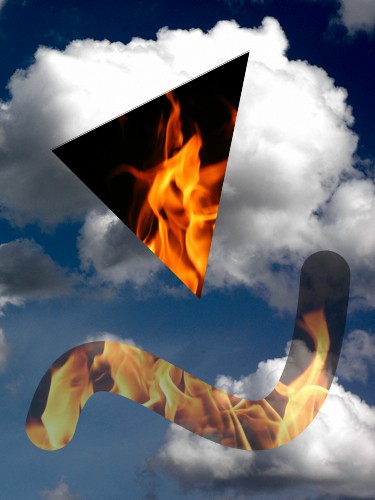
Now you can also draw it using a mask. Create any AUField with shades of gray, and tell the library to use this as a mask when you draw your picture. Values of the mask from 0 to 1 control the opacity of the corresponding pixels, from fully transparent to fully opaque. In other words, the mask is an alpha layer, but it’s better than Processing’s built-in alpha because the values are stored in floats, giving them much more range and precision. The layer is also separate from the pixels, making it easier and faster to modify.
The code is easy. When you call RGBtoPixels() to draw your AUMultiField object, just include another AUField argument, and that will be the mask. You can also mask a plain AUField object, and you can apply the mask when drawing either kind of object to an offscreen PGraphics buffer if you like. The new documentation gives the details.
Here’s the code for the image above. The mask is a white triangle and a 50% gray thick Bezier curve. There’s no draw() because in this simple example we’re just drawing one image. The cloud and fire images came from www.freeimages.com.
import AULibrary.*;

void setup() {
  // import images (both saved 375 wide by 500 high)
  PImage fireImage = loadImage("freeimages-1093986.jpg");
  PImage cloudsImage = loadImage("freeimages-1444573.jpg");

  size(fireImage.width, fireImage.height);

  // save the color fire image into fireField
  image(fireImage, 0, 0);
  AUMultiField fireField = new AUMultiField(this, 3, width, height);
  fireField.RGBfromPixels(AUMultiField.FIELD_REPLACE, 1.);

  // draw a fun mask in shades of gray. White=fire, Black=clouds
  background(0);                // black background
  fill(255);                    // fill with white
  triangle(50, 150, 200, 300, 250, 50);  // draw triangle
  noFill();                     // don't fill
  stroke(128);                  // only half bright
  strokeWeight(50);             // draw a big fat stroke
  bezier(50, 425, 100, 225, 300, 625, 325, 275);  // a little curve

  // save this grayscale image with values scaled to (0,1)
  AUField mask = new AUField(this, width, height);
  mask.fromPixels(AUField.FIELD_LUM, AUField.FIELD_REPLACE, 1/255.);

  image(cloudsImage, 0, 0);           // draw the clouds
  fireField.RGBtoPixels(0, 0, mask);  // draw the fire through the mask
}